What is RAG? A plain-English explainer for people who use AI but never built one
RAG, or retrieval-augmented generation, is the technique behind 'AI that can read your documents.' Here's what it actually does, what it does not fix, and when you actually need it.
By Kenji Tanaka, Insightful AI Desk
Level: beginner to intermediate. No prior machine-learning background required. If you already know what an embedding is, you can skim the first few sections.
You have probably seen the letters RAG stamped on a product page at some point in the last twelve months. AI assistants “powered by RAG.” Enterprise tools that promise “RAG over your documents.” Vendor demos where a chatbot answers a question that obviously was not in its training data, and someone in the room nods knowingly and says “ah, RAG.”
If you use these tools but have never built one, the word can feel like a checkpoint you have to pass before you are allowed to have an opinion. You do not.
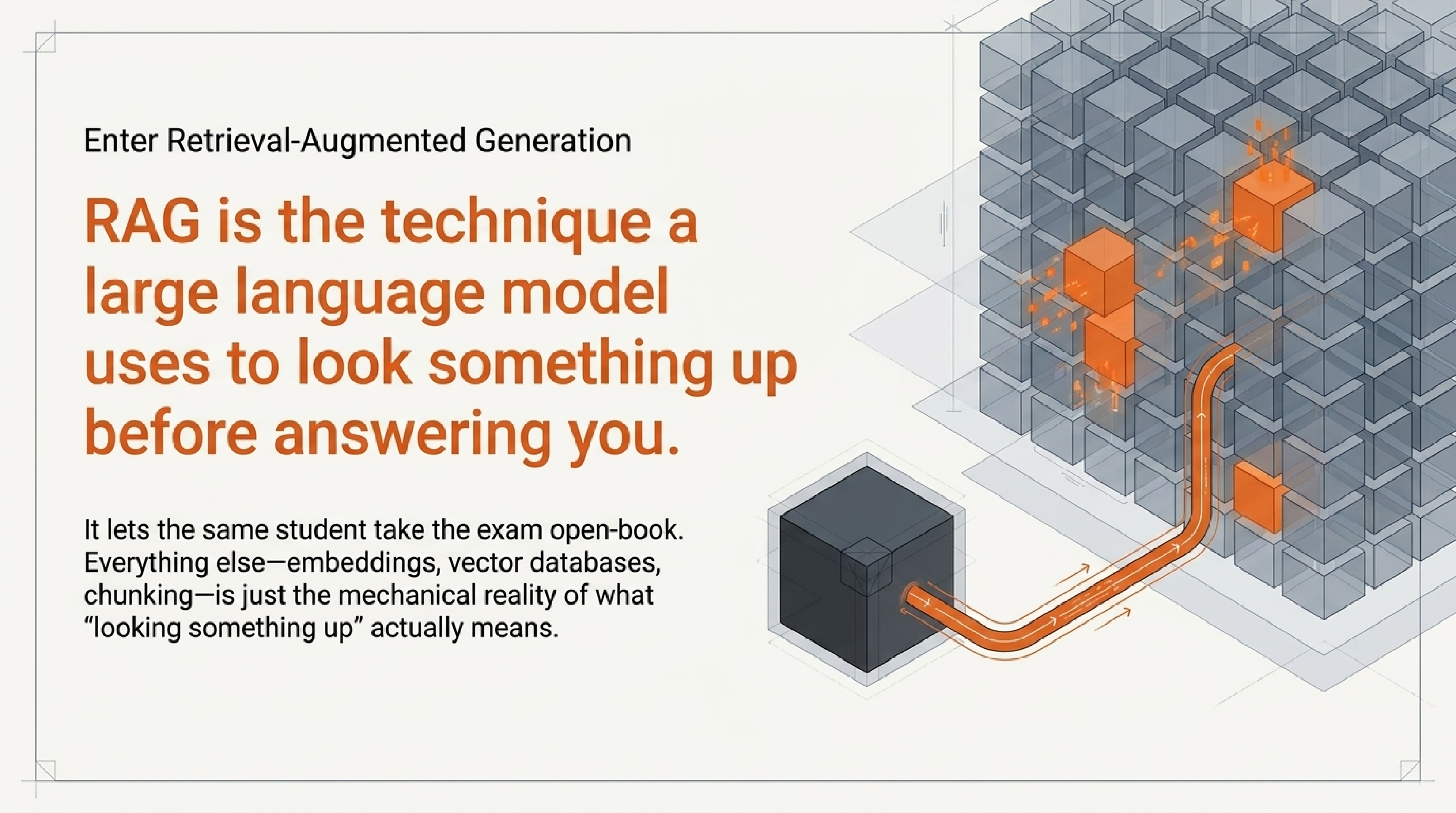
Here is what RAG actually is, in one sentence: it is the technique a large language model uses to look something up before answering you.
That is the whole idea. Everything else in this piece — the embeddings, the vector databases, the chunking strategies, the failure modes — is just unpacking that sentence honestly. What “look something up” really means. Why it matters. What it does not fix. And when you would actually want it.
The closed-book exam problem
A useful place to start is the way a vanilla language model — ChatGPT, Claude, Gemini, any of them — answers a question by default.
Imagine a student sitting a closed-book exam. They are smart, well read, and have studied an enormous amount of material. When you ask them a question, they answer from memory.
That works well for general questions. It works badly for three things in particular:
- Anything that happened after they studied. Their knowledge ends at their last exam-prep session — the training cutoff.
- Anything that was never in the textbooks they studied. Your company’s internal documents, your personal notes, last week’s support tickets.
- Anything specific enough that “remembering the gist” is not good enough. Exact policy clauses, exact prices, exact part numbers.
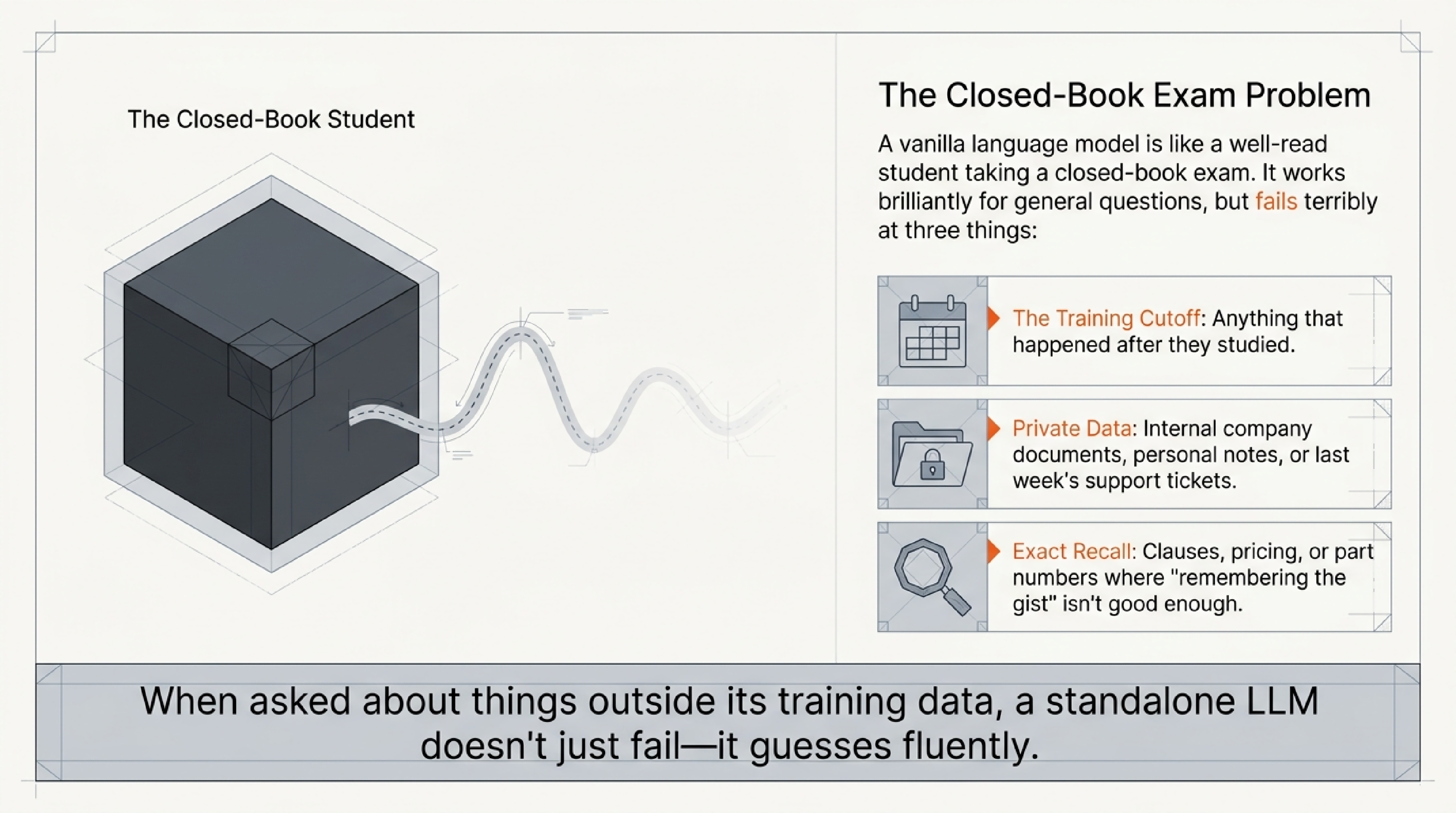
A language model on its own is exactly this closed-book student. It is fluent. It is often impressively well read. But when you ask it about something outside its training data — or something so specific that the model has to recall it word for word rather than paraphrase — it starts to guess. Sometimes the guess is right. Sometimes the guess is a confident, well-phrased sentence that is simply not true.
RAG is the technique that lets the same student take the exam open-book.
What “open-book” means in practice
When a system uses RAG, three things happen between your question and the answer you see. They happen in the background; you do not see them as separate steps, which is part of why the technique can feel mysterious from the outside.
Step 1: Retrieve.
Your question goes into a search system before it reaches the model. The search system has been pre-loaded with a body of documents — a company knowledge base, a product manual, a folder of PDFs, a wiki, the contents of a website. The search system pulls out the few passages that look most relevant to your question.
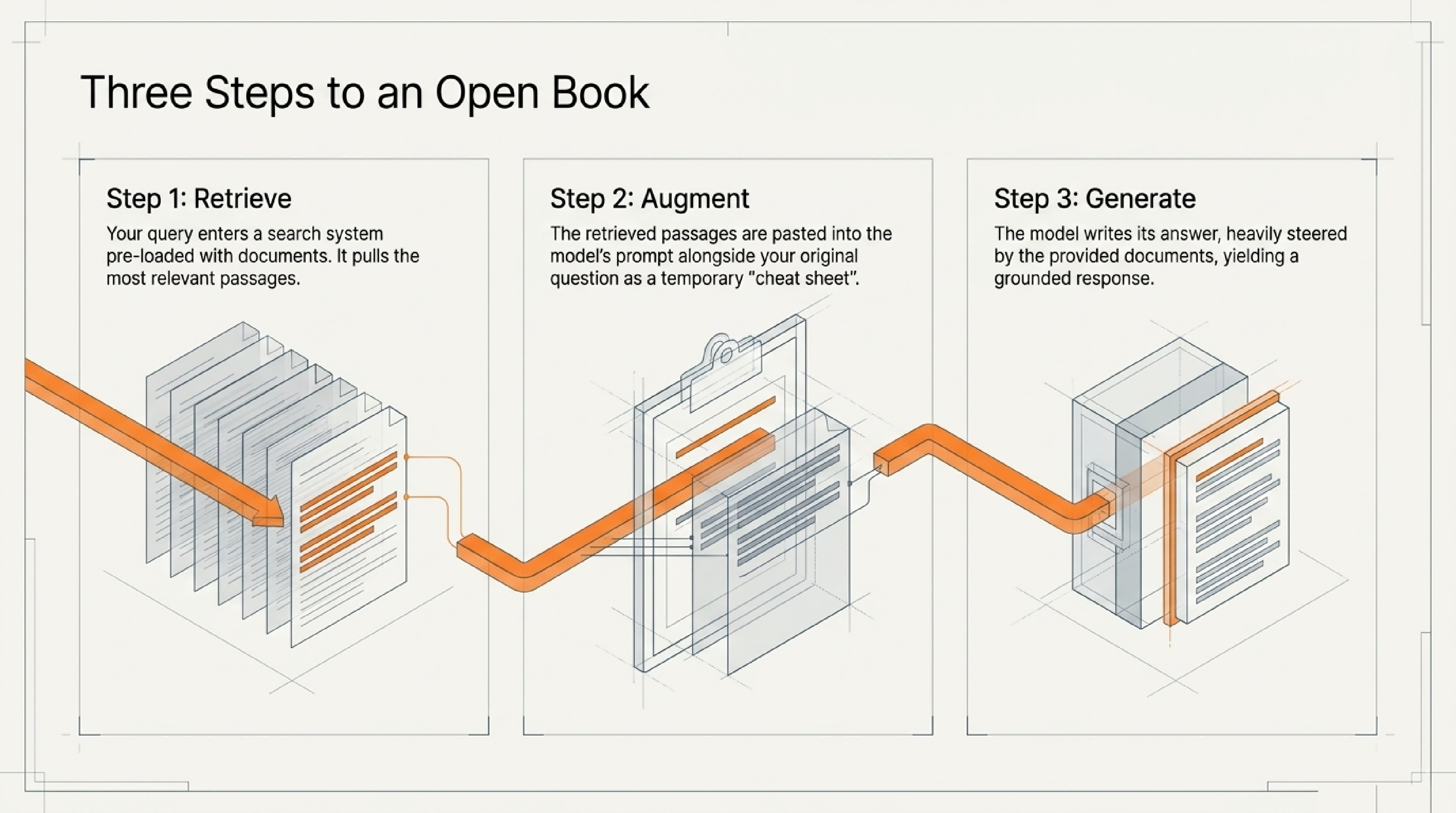
The “search” here is usually not the keyword search you would do in a file explorer. It is semantic search: the system converts your question and every document passage into a long list of numbers called an embedding, and then compares those number-lists to find passages whose meaning is closest to your question. This is why a RAG system can find the right passage even when your question uses none of the same words as the document. We will come back to embeddings in a moment.
Step 2: Augment.
The retrieved passages get pasted into the model’s prompt, alongside your original question, with instructions like “Answer the user’s question using only the information below.” This is the “augmented” in retrieval-augmented generation. The model has not been retrained — it has just been handed a cheat sheet for this specific question.
Step 3: Generate.
The model writes the answer the same way it always does, by predicting one word after another. The difference is that the cheat sheet is now sitting inside the prompt, so the model’s predictions are heavily steered by what the retrieved documents say.
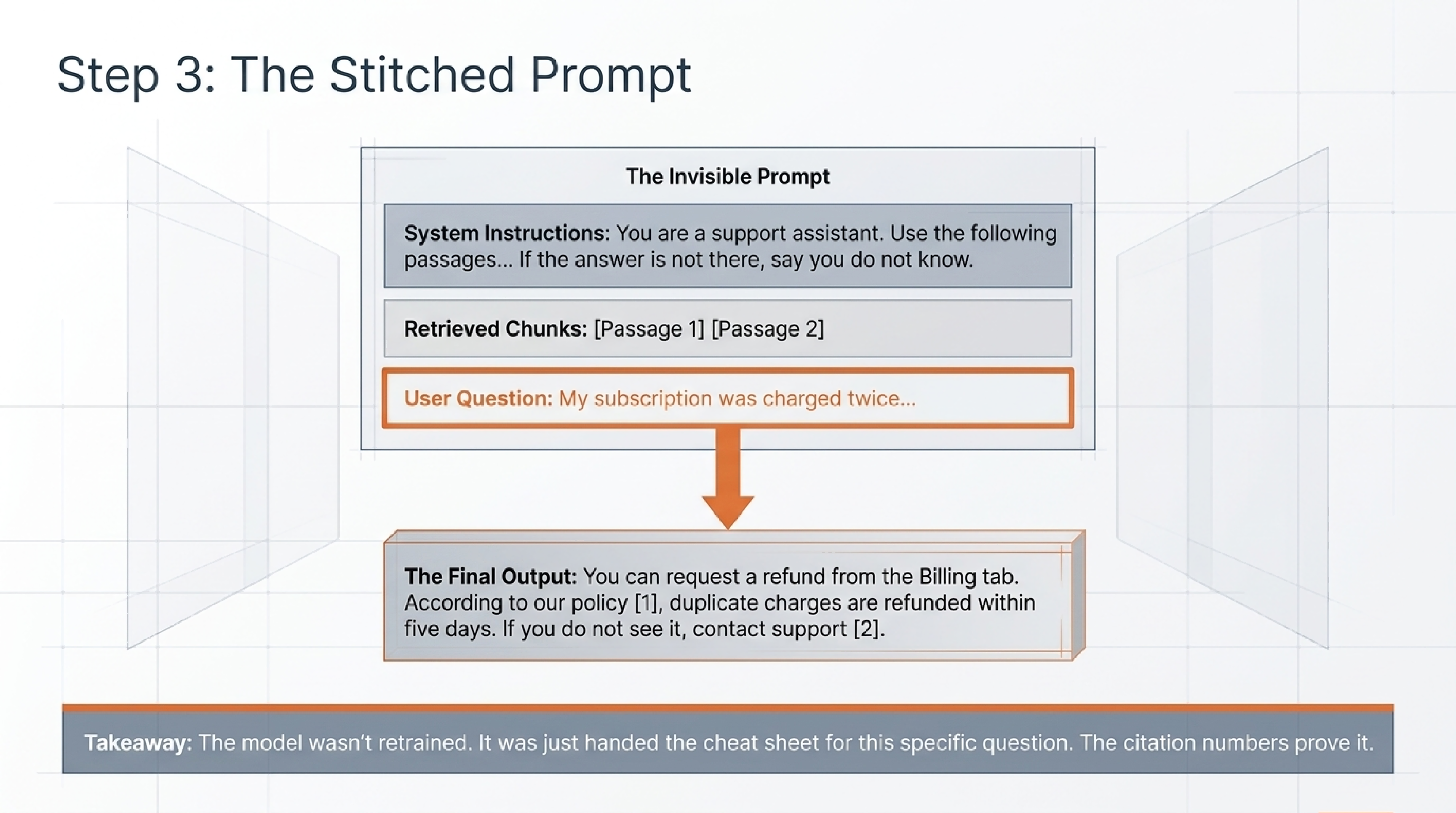
If you have ever used a chatbot that quotes your own documents back to you, with little citation numbers like [1] and [2] linking to source passages, you have used a RAG system. The numbers are the model telling you which retrieved chunk it leaned on.
A worked example, end to end
Abstract diagrams only get you so far. Let us walk through a concrete question, the way a real RAG system would handle it.
Imagine a customer-support chatbot built on top of a software company’s help-center articles. A user types:
“My subscription was charged twice last month. How do I get a refund for the duplicate?”
Here is what happens, step by step:
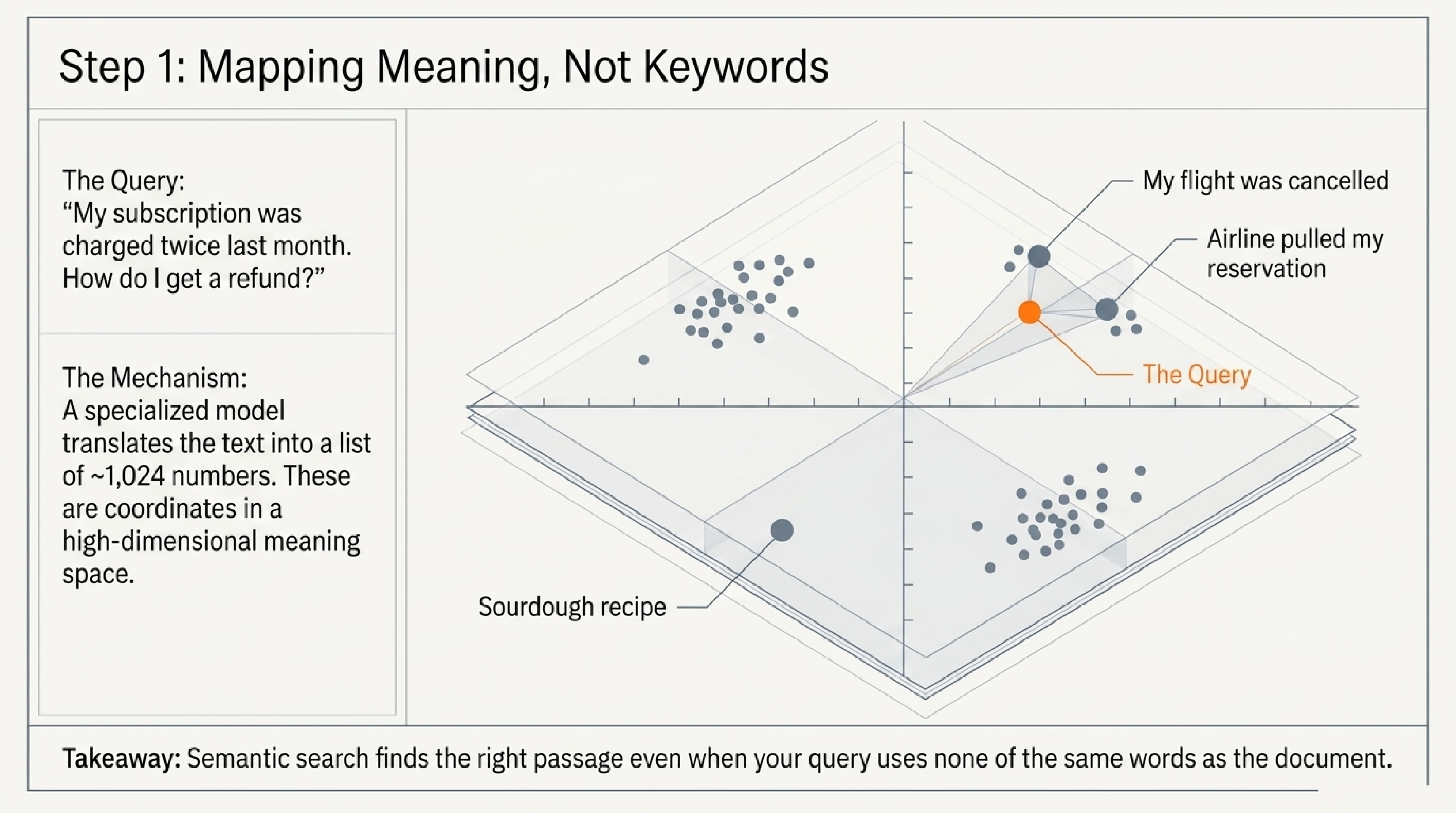
- The user’s question is turned into an embedding. A small embedding model reads the question and produces a list of, say, 1,024 numbers. You can think of those numbers as the question’s coordinates in a very high-dimensional “meaning space.” Questions with similar meanings end up at nearby coordinates.
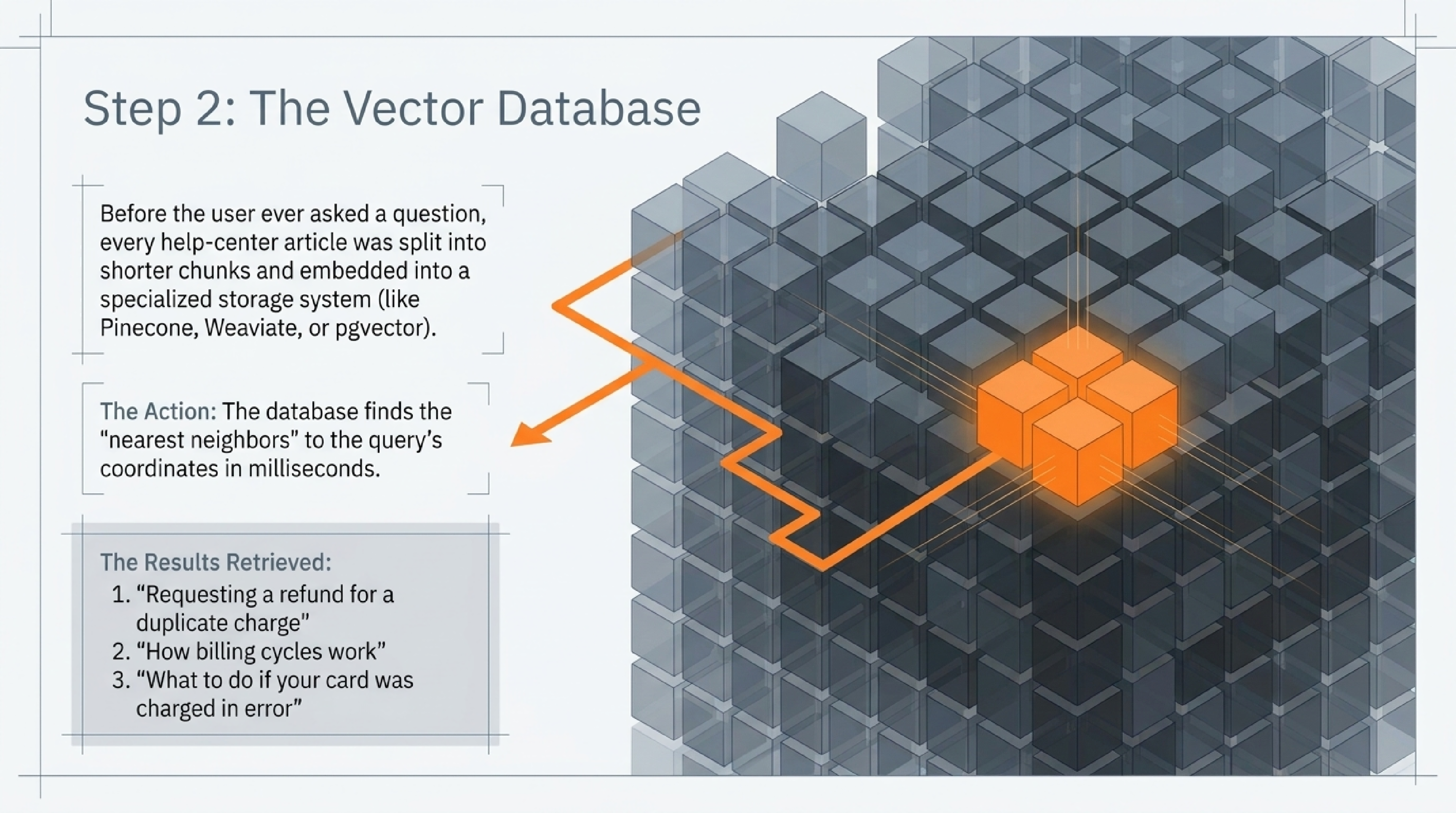
- The system searches a vector database. Before any user ever asked anything, every help-center article was split into shorter chunks (a few paragraphs each) and each chunk was also turned into an embedding. Those embeddings were stored in a specialised database that can find “nearest neighbours” in that high-dimensional space very quickly. The retriever now finds the chunks whose embeddings sit closest to the user’s question.
- The top results come back. The top three results might be passages from articles titled “Requesting a refund for a duplicate charge,” “How billing cycles work,” and “What to do if your card was charged in error.” Note that the user’s question never used the word “duplicate charge” or “refund policy” in exactly those terms — the semantic match did the work.
- The model gets a stitched-together prompt. Behind the scenes, the system builds a prompt that looks roughly like: “You are a support assistant. Use the following help-center passages to answer the user. Only use information from these passages; if the answer is not there, say you do not know. [Passage 1] [Passage 2] [Passage 3] User question: My subscription was charged twice last month…”
- The model writes its answer. Drawing on the passages, the model might reply: “You can request a refund for the duplicate charge from the Billing tab in your account settings. According to our policy [1], duplicate charges are typically refunded within five business days. If you do not see the credit by then, contact support [2].” The little numbers link back to the source passages, so the user can verify.
That whole flow — question to embedding, embedding to nearest neighbours, neighbours into prompt, prompt to answer — happens in a second or two. The user sees only the final paragraph.
Embeddings, explained a little more carefully
The word embedding does most of the heavy lifting in any RAG system, so it is worth slowing down on.
An embedding is just a list of numbers — typically several hundred to a few thousand of them — produced by a small specialised model when you feed it a piece of text. The trick is that the model has been trained so that similar meanings produce similar number-lists.
If you turn the sentence “my flight has been cancelled” into an embedding, and you turn the sentence “the airline pulled my reservation” into an embedding, the two number-lists end up close together, even though the words barely overlap. If you turn “my recipe for sourdough” into an embedding, it lands somewhere completely different.
That “closeness” is measured the way you would measure distance between two points on a map — just generalised to a space with hundreds of dimensions instead of two. The retriever’s job is to find, out of millions of pre-computed document embeddings, the handful that sit closest to the embedding of your question.
Two things follow from this that beginners often miss.
First, embeddings are not magic; they are trained. Different embedding models, trained on different data, produce different number-lists. An embedding model trained mostly on English news will not place medical jargon as cleanly as a model trained on biomedical text. Choosing the right embedding model for your domain is a real engineering decision, not a free default.
Second, embeddings only capture what the training data taught them to capture. They are very good at semantic similarity. They are not as good at things like exact-number matching, version numbers, dates, or anything where the literal characters matter more than the meaning. This is why production RAG systems often pair embedding-based search with old-fashioned keyword search and combine the results — a technique called hybrid retrieval.
The retriever’s other half: vector databases
The other component you will see named in vendor pitches is the vector database. This is the specialised storage system that holds all those pre-computed document embeddings and can answer the question “which stored vectors are closest to this new query vector?” in milliseconds, even when there are millions of stored vectors.
Several products live in this space — Pinecone, Weaviate, Qdrant, Milvus, and pgvector (an extension that adds vector search to ordinary PostgreSQL) are some of the names that come up. From a non-builder’s perspective, the differences mostly come down to hosted versus self-hosted, scaling characteristics, and how well the database plays with the rest of a company’s data infrastructure. Functionally, they all do the same job: store vectors, find nearest neighbours, return them fast.
If a vendor proudly tells you they “use Pinecone” or “use pgvector,” what they are really telling you is which engine sits in the middle of step two from the walk-through above. It is one component, not the whole system.
Why people use it
Three concrete reasons, each paired with the limitation that comes with it. The pairing matters: every benefit of RAG has an edge where it stops applying.
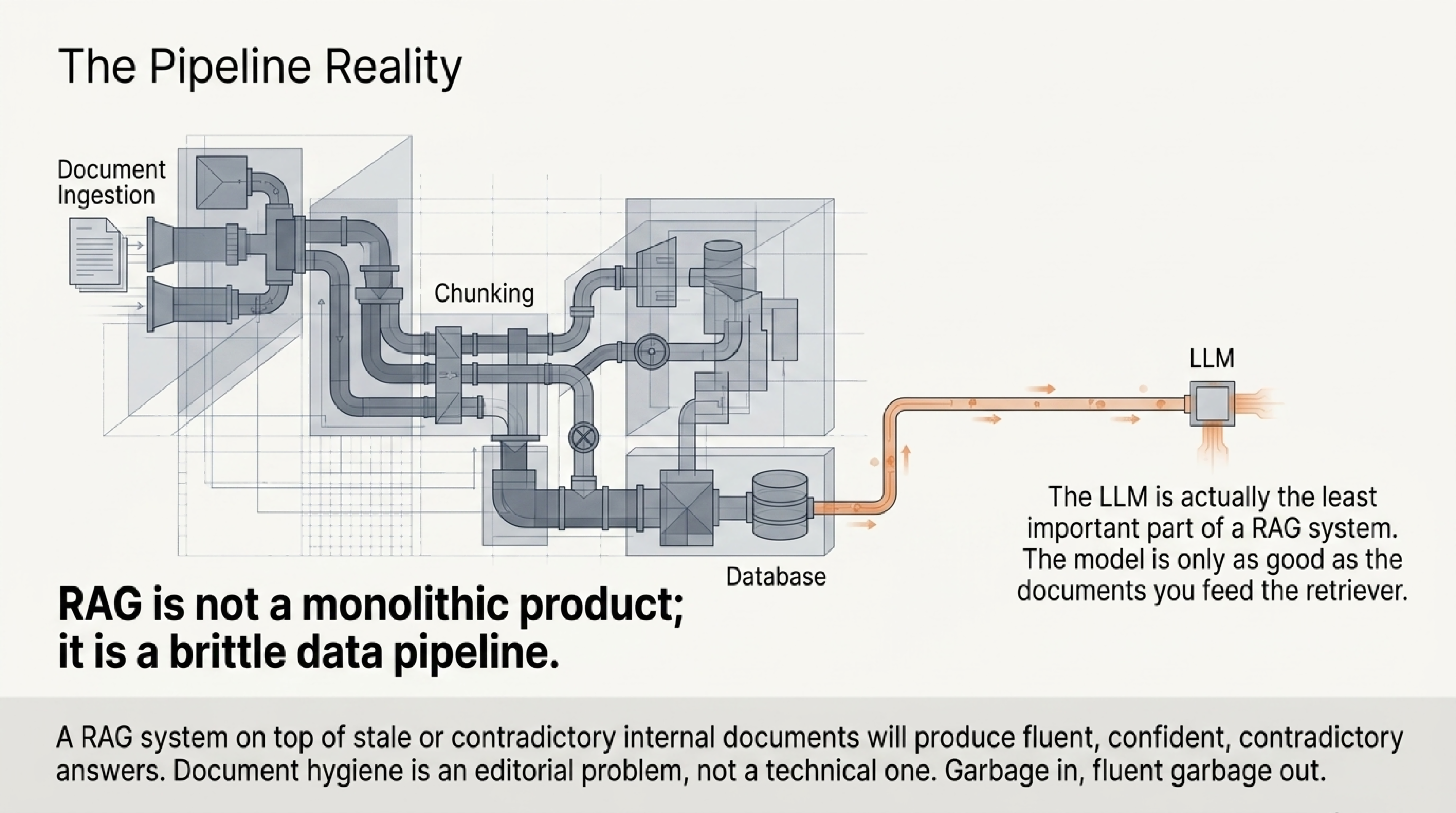
It lets a model answer questions about content it was never trained on — like your own documents. The limitation: the model is now only as good as the documents you fed the retriever. Garbage in, fluent garbage out. A RAG system on top of stale or contradictory internal documents will produce fluent, confident, contradictory answers. Document hygiene becomes an editorial problem, not a technical one.
It reduces (but does not eliminate) hallucination on factual queries. When the model is given a relevant source passage and told to answer from it, the model is much more likely to stick to what the passage says. The limitation: “much more likely” is not “always.” Models still sometimes invent details the source does not contain, especially when the retrieved passage is partial, contradictory, or off-topic. Citation links help, but only if the reader actually clicks them and checks. Citation alone, without verification, can give a false sense of authority.
It is cheaper and faster to update than retraining the model. If your product manual changes, you re-index the new version into the retrieval system overnight and the chatbot is current the next morning. You did not retrain a billion-parameter model; you updated a search index. The limitation: this only works for content that fits the retrieval pattern. It does not teach the model new skills or new reasoning styles. For those, you need fine-tuning or a different model entirely. Updating documents will not make a model better at code review; it will only make it better at code-review questions whose answers happen to be written down somewhere.
What RAG is not
A handful of common misconceptions are worth clearing up, because they show up in vendor pitches and product reviews.
RAG is not “training the model on your data.” Nothing about your documents changes the model’s weights. The documents sit in a separate database. If you switch to a different underlying model tomorrow, the retrieval setup still works, because retrieval is model-agnostic. Conversely, the model has not “learned” your documents in any permanent sense — it can only use them when they are pulled into the prompt at query time.
RAG is not a guarantee of accuracy. It is a strong tilt toward grounded answers. The model can still pick the wrong passage, misread a passage, or fill in a detail that was not in any passage. Auditing the citations matters. A common pattern in production is to have a second model or a rules-based check verify that the answer is actually supported by the retrieved passages before showing it to the user.
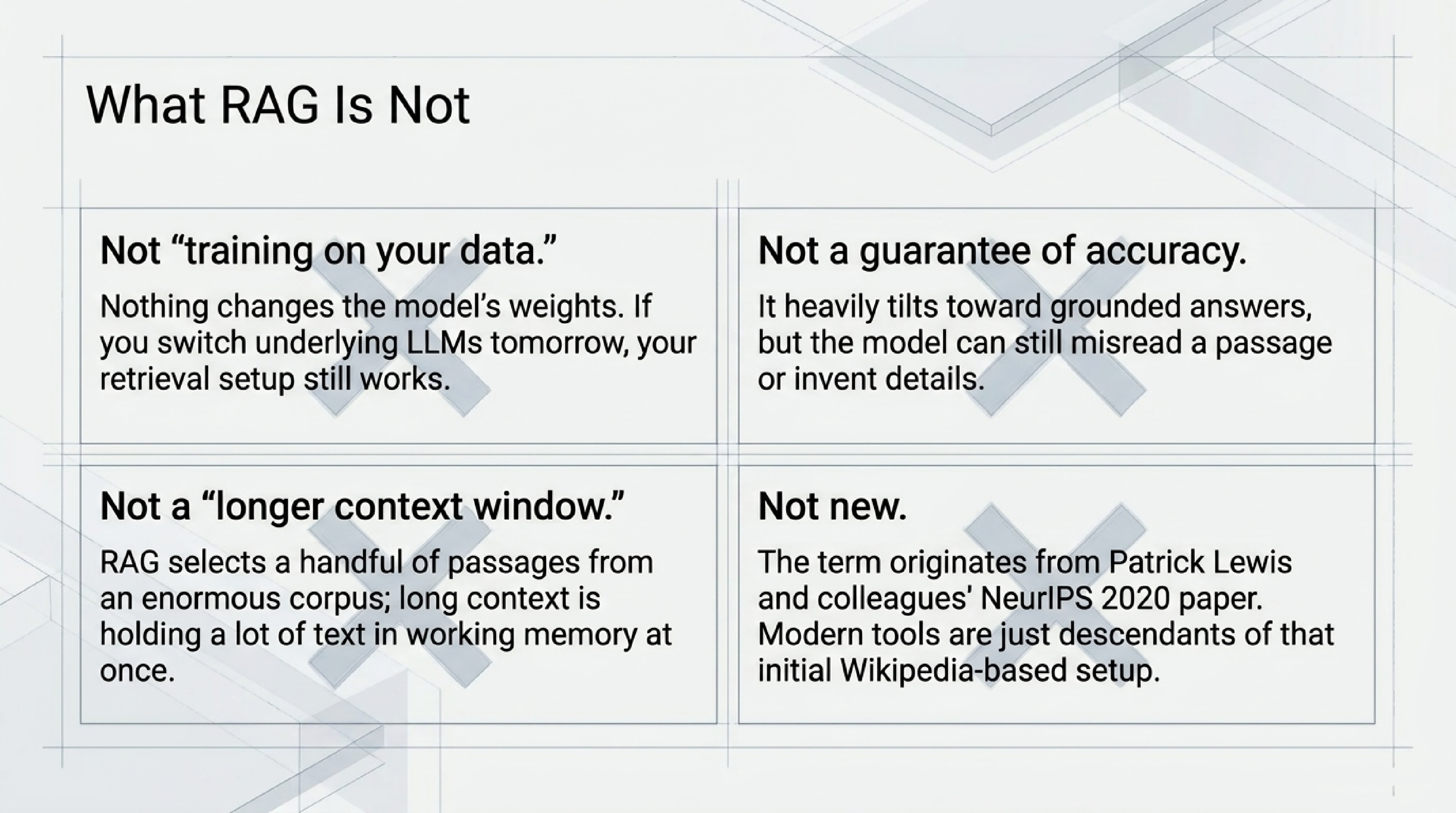
RAG is not the same as a “longer context window.” You may have heard that newer models can read entire books in a single prompt. That is true, and useful, but it is a different mechanism. RAG selects a handful of relevant passages from a potentially enormous corpus; a long context window means the model can hold a lot of text in working memory once it is there. Most real systems use both: retrieval to find the right material, a long context window to fit it.
RAG is not new. The term comes from a paper that Patrick Lewis and colleagues published at NeurIPS 2020, “Retrieval-Augmented Generation for Knowledge-Intensive NLP Tasks” (arXiv:2005.11401). The paper combined a pre-trained sequence-to-sequence model with a dense vector index of Wikipedia, and showed that the combination beat the standalone model on open-domain question-answering tasks. Almost every modern RAG product is a descendant of that setup, with the corpus swapped from Wikipedia to whatever the customer cares about, and the retriever and generator components often upgraded several generations beyond what the original paper used.
Where RAG breaks
If you are evaluating a product, knowing the common failure modes is more useful than knowing the success cases. The success cases all look the same in a demo. The failures are what you will live with.
The retriever returns the wrong passage. Embedding-based search is approximate. It finds passages whose general meaning is close, not passages that exactly answer the question. If the user asks about “the return policy for digital goods” and the retriever pulls back a passage about “the return policy for physical goods,” the model will fluently apply the wrong rule. The answer will sound right, with citations, and be wrong.
The chunks are the wrong size. Documents have to be broken into smaller pieces before they can be embedded, because embedding a 200-page PDF as a single unit loses all the detail. Choose chunks that are too small and the retriever loses context (a single sentence about “30 days” with no indication of what the 30 days refers to). Choose chunks that are too large and the embedding becomes a fuzzy average of multiple topics, and the retriever stops finding the right one. There is no universal correct answer; the right chunking strategy depends on the documents.
The passages contradict each other. A real document corpus often contains outdated policies sitting next to current ones, two product lines with overlapping vocabulary, or notes from different teams that disagree. The retriever does not know which is current. It returns the most semantically similar passages, regardless of which is true today. Without metadata-aware retrieval — for example, filtering to only the latest version of each document — the model has to pick between conflicting sources, and there is no guarantee it picks the right one.
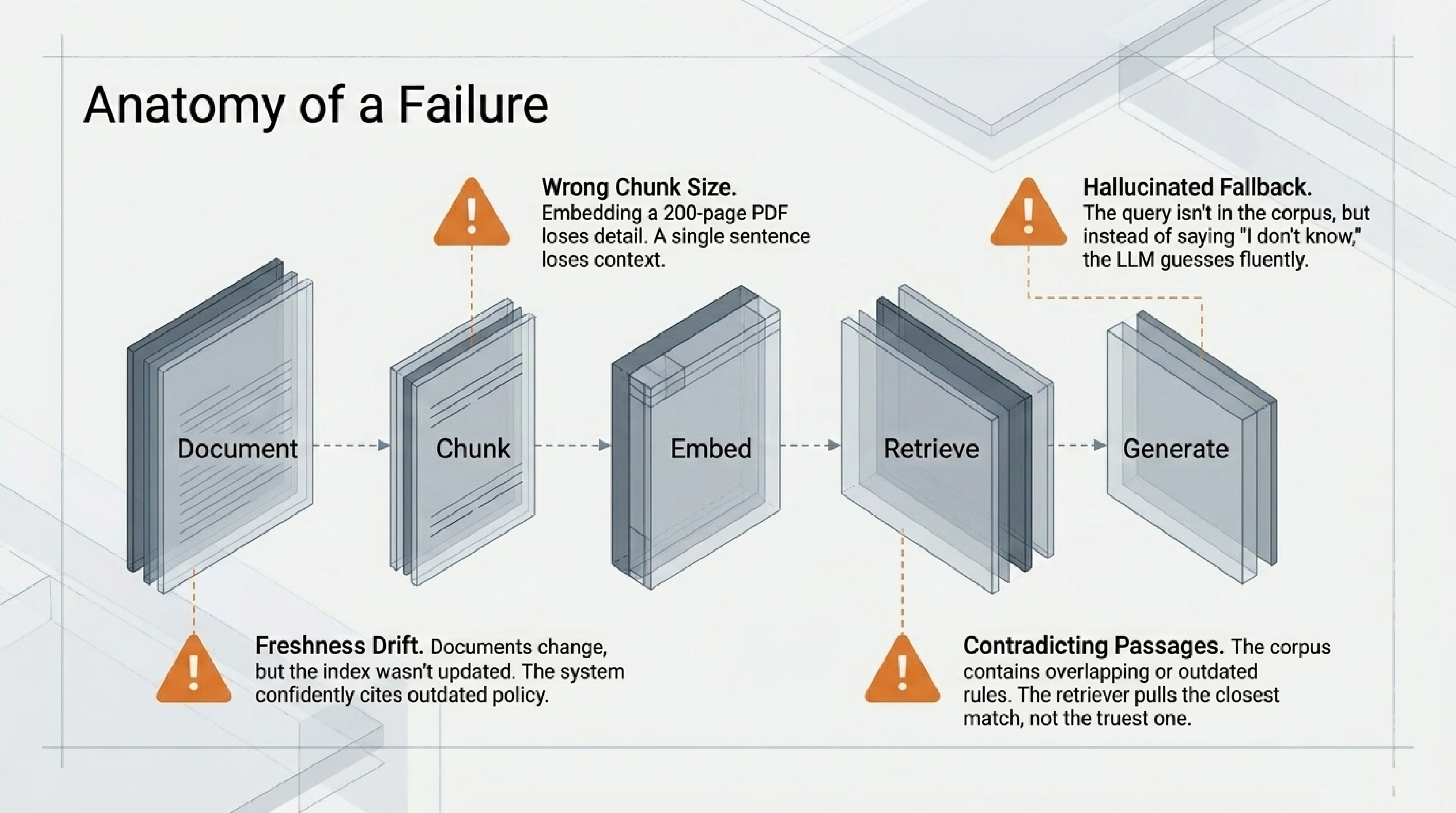
The user asks something the corpus does not cover. A well-designed RAG system instructs the model to say “I do not know” when the retrieved passages do not contain the answer. A poorly designed one lets the model fall back on its general training and generate a plausible-sounding answer with no grounding at all — usually presented with the same confident citation-style framing as a grounded answer. This is the failure that destroys user trust the fastest.
The freshness of the index drifts. Re-indexing is a background job that someone has to maintain. When the documents change but the index does not, the system continues to confidently cite a passage that no longer reflects current policy. Users do not see this; they see a citation, and assume the citation is current.
None of these failure modes invalidate RAG. They just mean “RAG” is not a product on its own. It is a recipe whose quality depends on the ingredients and the cooking.
RAG, fine-tuning, and long context windows
The three techniques often get presented as competitors. They are not; they solve different problems. A short decision frame:
Use RAG when you need the model to refer to a specific body of facts that change over time and need to be cited. The classic cases are customer support, internal knowledge bases, document search, regulatory compliance, and any “ask questions about my documents” product.
Use fine-tuning when you need the model to acquire a new style or skill — respond in a particular tone, follow a specific output format consistently, or perform a narrow task more reliably than prompt engineering can achieve. Fine-tuning teaches the model how to behave; it does not teach it new facts in any reliable way. (Fine-tuning a model on a thousand product-manual paragraphs will not produce reliable answers about that product; it will produce a model that sounds vaguely like the product manual.)
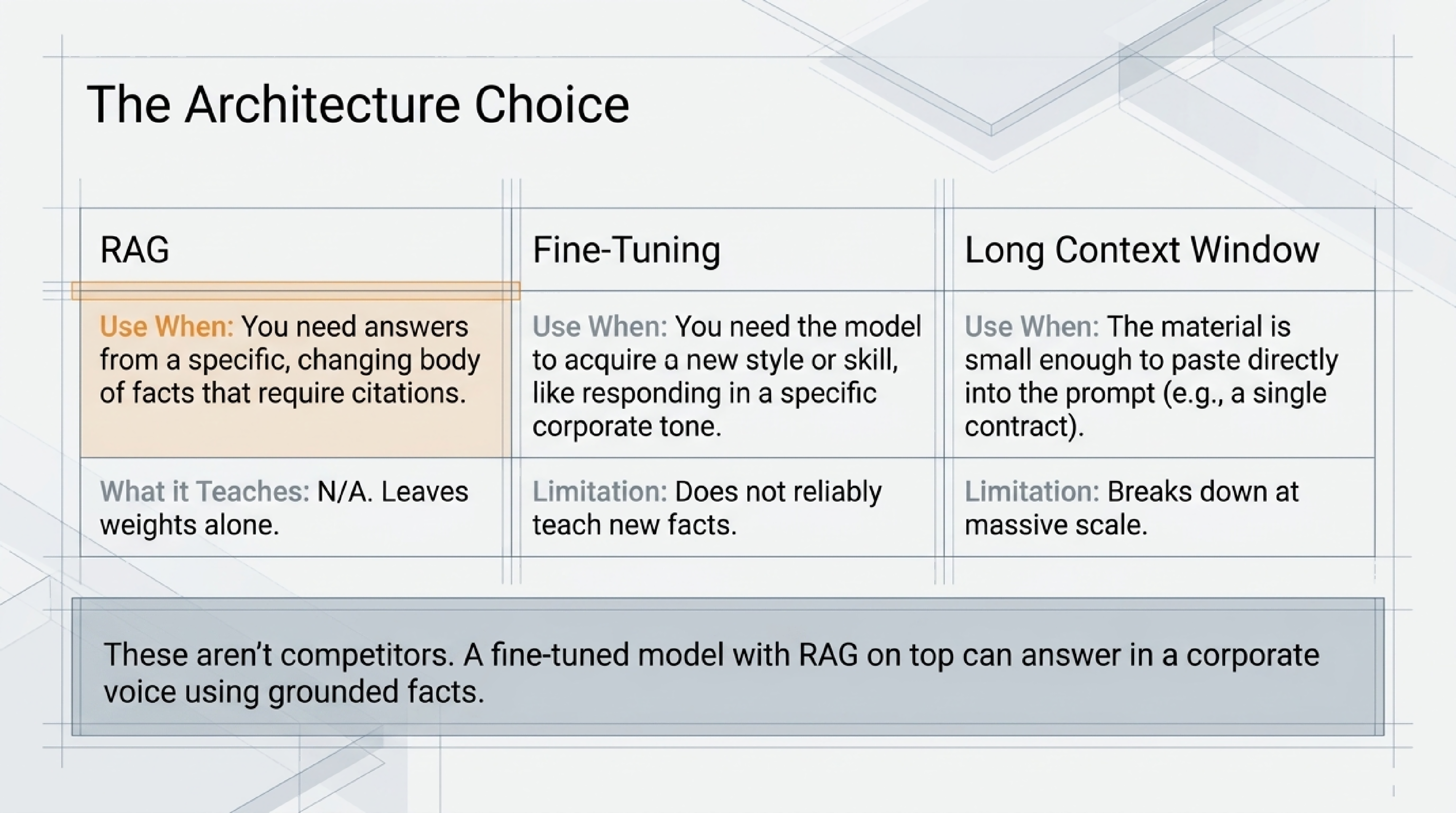
Use a long context window when the body of relevant material is small enough to paste into the prompt directly — a single contract, a single research paper, a short book. You skip the retrieval step entirely and let the model read everything. This is often the simplest and most accurate approach when it fits.
A lot of real systems use combinations. Long-context models with RAG on top can read a few retrieved chapters instead of a few retrieved paragraphs. Fine-tuned models with RAG on top can answer in a specific corporate voice while still grounding their answers in retrieved facts. The techniques compose; the only mistake is treating them as either-or.
How to tell if a RAG product is actually working
This is the question most non-builders end up needing to answer. A vendor demo will always look good; the question is whether the system holds up on the questions you actually care about.
A handful of simple checks go a long way, and none of them require an engineering background.
Test it on a question whose answer you already know. Pick a fact from your documents that you can verify, and ask the system. Read the answer. Click the citation. Does the cited passage actually support the answer, or does the model paraphrase something the passage does not quite say? This single test catches more failures than any benchmark.
Test it on a question whose answer is not in the documents. The right behaviour is for the system to say it does not know, or to clearly flag that no relevant source was found. The wrong behaviour is a fluent, confident answer with no grounding. If a system invents an answer when the corpus has nothing to say, it will invent answers elsewhere too — you just will not notice.
Test it on a question with a recently updated answer. If your policy changed last week, ask a question about that policy. Does the system answer with the old policy or the new one? This tells you whether the retrieval index is being kept fresh, and how stale “fresh” really is.
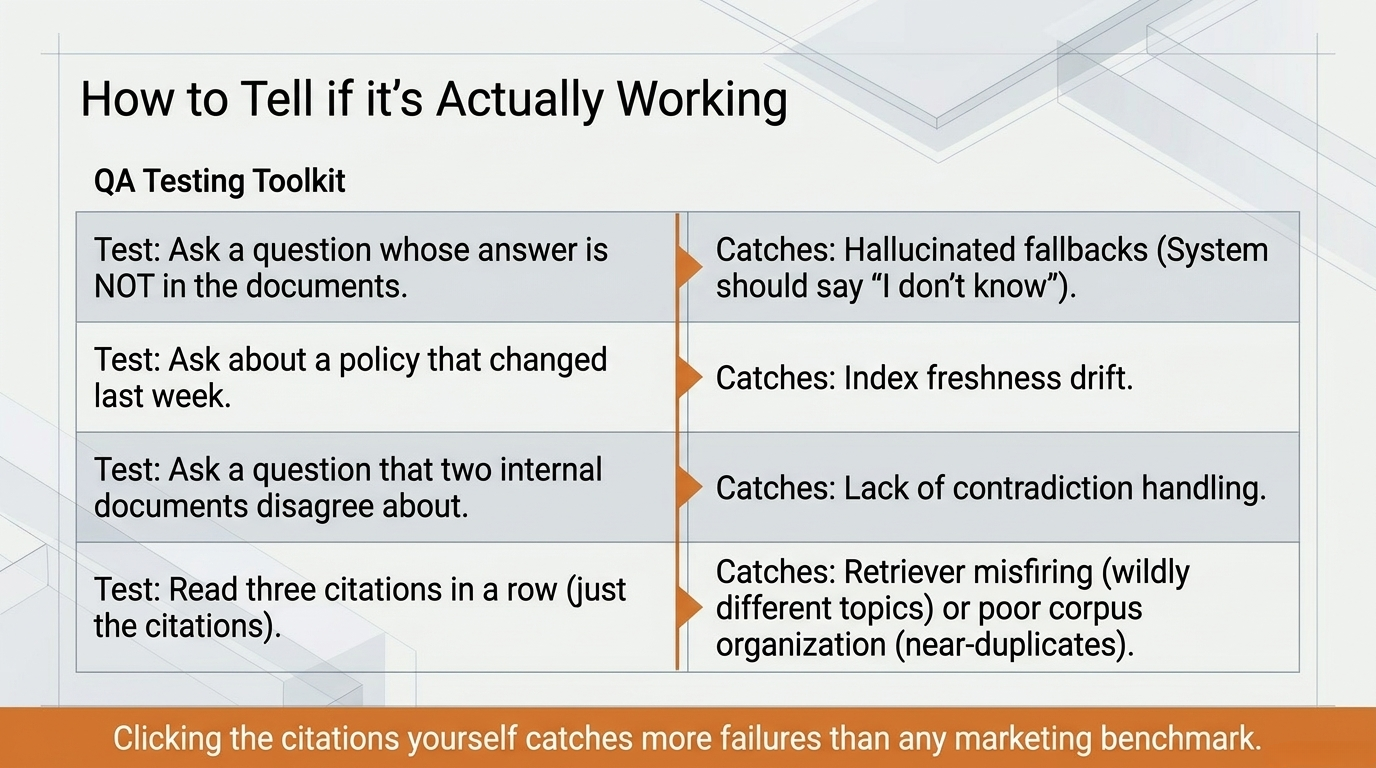
Test it on a question that two passages disagree about. Real document corpora contain contradictions. A good system surfaces the disagreement (“Source A says X, source B says Y”); a less careful one picks one passage and presents it as the answer with no caveat.
Read three citations in a row. Not the answer, just the cited passages. If they are wildly different topics, the retriever is misfiring. If they are near-duplicates of each other, the corpus is poorly organised. Either way, you have learned something about the system before any users hit it in production.
None of these tests require ML expertise. They require ten minutes and a willingness to actually click the citations — which is also, fortunately, the same habit you want your end users to develop.
When you would actually want it
If you are evaluating a product that advertises RAG — or considering whether to ask your engineering team to build something — the question is rarely “is RAG good?” It is “is this problem a retrieval problem?”
You probably want a RAG-style system when:
- The answers your users need live in a specific body of documents you control.
- Those documents change often enough that retraining a model is impractical.
- Citation and source-tracing matter — for compliance, auditing, or user trust.
- The body of documents is too large to paste into a single prompt.
You probably do not need RAG when:
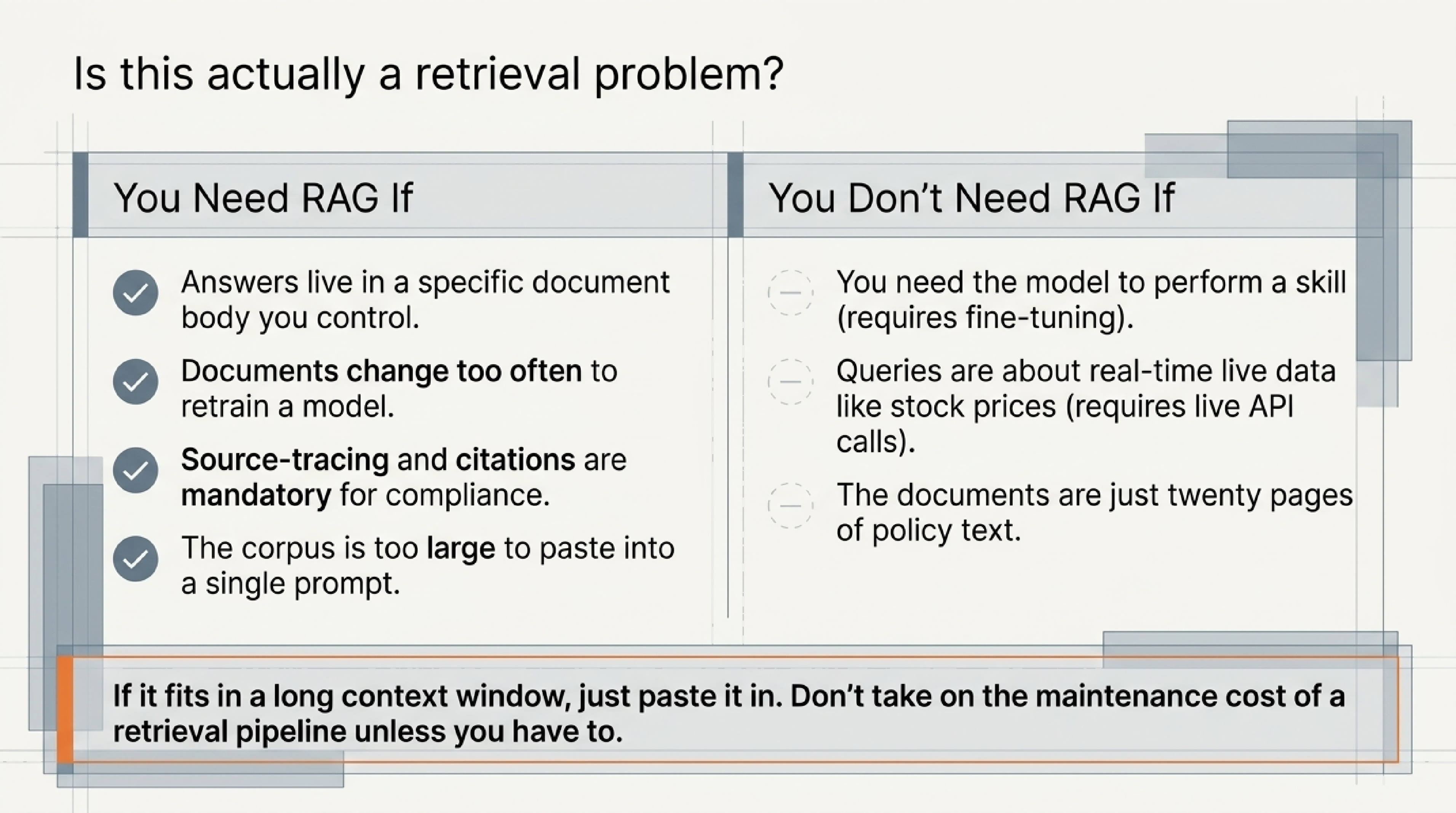
- The question is something a general-purpose model already knows well.
- You need the model to perform a skill rather than recall a fact.
- The body of documents is small enough to fit directly inside a prompt.
- The user’s questions are about real-time data (current stock prices, live sensor readings) rather than relatively stable text. Live data needs a different pipeline.
That third case — small enough to fit in a prompt — is worth pausing on. A surprising amount of “we need RAG” turns out, on inspection, to be “we have twenty pages of policy text and a long context window.” The simpler system is often the right answer; the extra moving parts of a retrieval pipeline are a maintenance cost you should only take on when the simpler approach genuinely does not fit.
What to take away
RAG is one of those terms that sounds like it requires a degree to understand, and then turns out to be something you could explain to a curious teenager in five minutes.
Strip the jargon and it is this: find the right passages, hand them to the model, ask the model to answer using them. That is the whole pattern. The interesting engineering — how to chunk documents, how to choose an embedding model, how to evaluate retrieval quality, how to handle conflicting sources — all sits underneath that one idea.
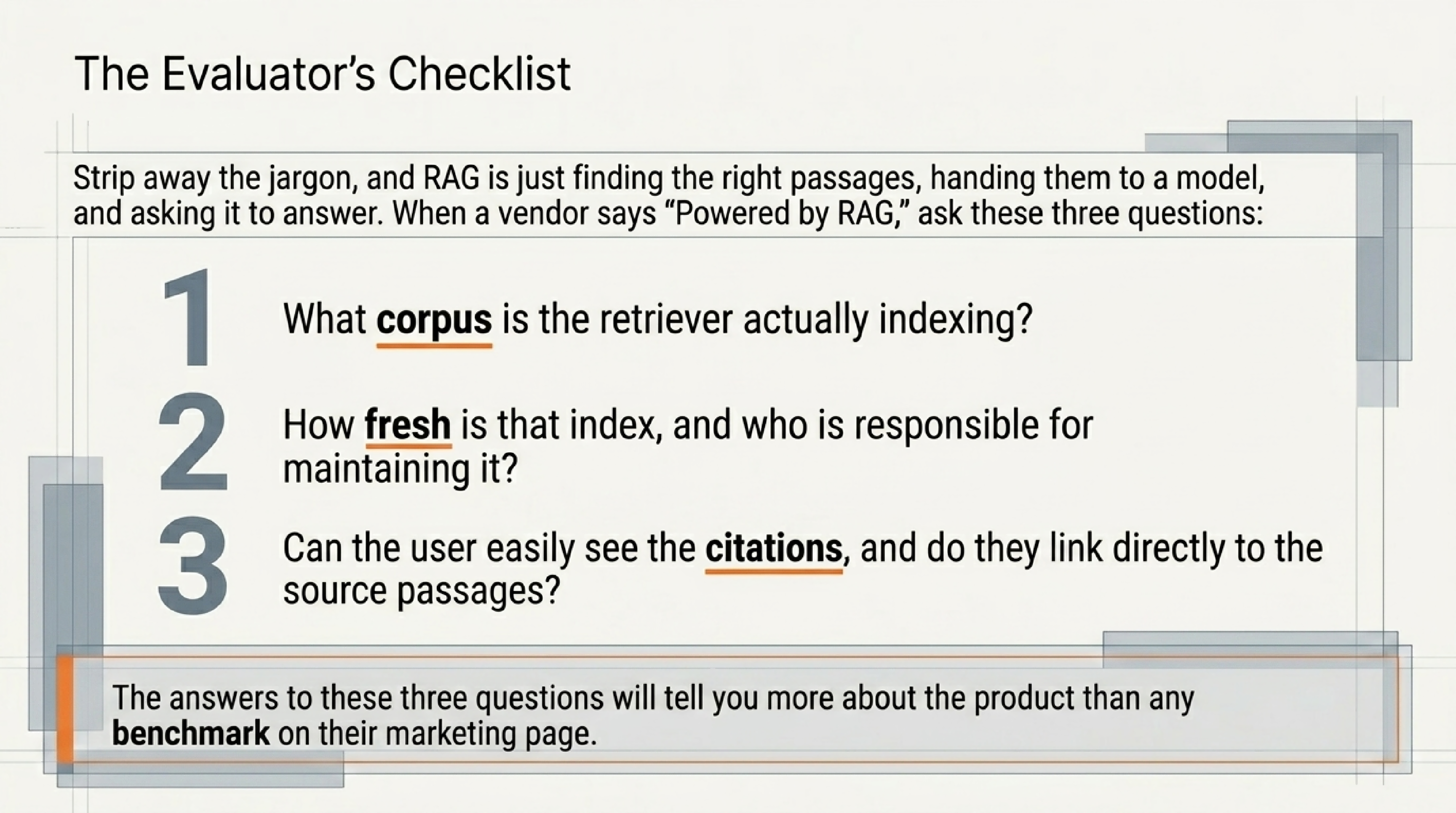
If you take one thing from this piece, take this: when a vendor says “powered by RAG,” you now know to ask three follow-up questions.
- What corpus is the retriever indexing?
- How fresh is it, and who maintains the index?
- Can the user see the citations, and do they link to the actual source passages?
The answers will tell you more about the product than any benchmark on the marketing page.
We will come back to embeddings, vector databases, and retrieval evaluation in their own pieces. For now, you have the map.
A short glossary
Embedding. A list of numbers that represents the meaning of a piece of text. Produced by a small specialised model. Used so that semantic similarity can be measured as geometric distance.
Vector database. A storage system optimised for finding the “nearest neighbours” among millions of embeddings. The component that makes retrieval fast.
Chunking. The process of splitting long documents into smaller passages before embedding them. The right chunk size is a tuning decision, not a fixed answer.
Hybrid retrieval. Combining embedding-based semantic search with traditional keyword search, then merging the results. Useful when the literal characters matter (product codes, version numbers, exact phrases).
Grounded answer. An answer generated using retrieved passages, ideally with citations back to those passages. Contrast with a free-form answer pulled from the model’s training data alone.
Context window. The maximum amount of text a model can hold in its prompt at one time. RAG is one way to work around small context windows; long-context models reduce but do not eliminate the need for retrieval.
Fine-tuning. Updating a model’s weights on new training data to change how it behaves. Different from RAG, which leaves the weights alone and changes only the prompt.
Retriever. The component of a RAG system that finds relevant passages. Usually an embedding model plus a vector database, sometimes augmented with keyword search and metadata filters.
Further reading: the original RAG paper, Lewis et al., 2020, is more readable than most machine-learning papers. The first three pages are accessible to anyone who finished this article.
How we use AI and review our work: About Insightful AI Desk.